Dash Camera Cable Kits
Best Dash Camera Cable Kits for Parking Mode and Every Connector
7 picks compared
8 min read
ProductPickly is reader-supported. When you buy through links on our site, we may earn an affiliate commission at no extra cost to you. It never changes our picks.
The short answerFor most drivers the Gebildet Type-C Dash Cam Hardwire Kit is the standout pick, a USB-C fuse-tap kit with built-in low-voltage protection and a long 13ft cable that hides cleanly around the cabin. If tapping a fuse sounds daunting, the OBD2 to USB-C cable plugs straight into the OBD-II port for a two-minute install with a voltmeter and four-level cutoff. The EWAY 3-in-1 kit is the safe choice when you are unsure of your connector, the adjustable-cutoff USB-C kit is best for protecting an older battery, the four-fuse-tap kit fits more fuse boxes, the mini USB kit keeps older cameras powered, and the ROVE Ultimate kit is the guaranteed match for ROVE owners. Choose by connector, install method, and whether you want parking mode rather than by the biggest claim on the box.
?How we pickedWe compare published specifications, safety certifications and thousands of verified owner reviews, and we do not physically test every unit. Read the full process in our review methodology.
Gebildet Type-C Dash Cam Hardwire Kit (13ft)
★★★★★ 4.5 / 5 Best overall
This is the kit we would reach for first because it covers the things that matter for a clean install: a USB-C output that fits most current cameras, built-in low-voltage protection so parking mode does not flatten the battery, and a full 13ft of cable to tuck around a headliner. It is a fuse-tap hardwire kit rather than a plug-in adapter, so it takes a bit more effort but hides completely once it is in.
Connector USB-C outputInstall type Fuse-tap hardwire, 12V to 24VBattery care Low-voltage cutoff built inCable length About 13ft for full routing
- Long 13ft cable reaches around most cabins
- USB-C fits most current dash cameras
- Low-voltage protection guards the battery in parking mode
- Fuse-tap install takes more effort than a plug-in kit
- Cutoff threshold is fixed, not adjustable
Best for: a clean, hidden USB-C install with room to route the cable
OBD2 to USB-C Dash Cam Power Cable with Voltmeter
★★★★★ 4.4 / 5 Best plug and play
If tapping a fuse box sounds daunting, this kit skips it by plugging straight into the OBD-II port under the dash, so most people can fit it in a couple of minutes. It adds ACC detection to tell driving from parked, four-level low-voltage protection, and an LED voltmeter so you can watch battery health rather than guess at it.
Connector USB-C output, OBD-II inputInstall type Plug and play, no fuse tapBattery care Four-level low-voltage protectionExtras ACC detection and LED voltmeter
- Plugs into the OBD-II port with no fuse work
- Four selectable cutoff levels for parking mode
- Voltmeter shows live battery voltage
- OBD-II port then sits occupied
- Bulkier plug than a slim fuse tap
Best for: drivers who want a fast install without touching the fuse box
EWAY 3-in-1 Micro, Mini, and Type-C Hardwire Kit
★★★★★ 4.4 / 5 Best for mixed connectors
The strength here is flexibility: this hardwire kit ships with micro USB, mini USB, and USB-C tips, so it fits an older camera today and a replacement later without buying a new cable. It keeps the same low-voltage protection and long 13ft run as a single-connector kit, which makes it a safe pick when you are unsure exactly which port your camera uses.
Connector Micro USB, mini USB, and USB-C tipsInstall type Fuse-tap hardwire, 12V to 24VBattery care Low-voltage cutoff built inCable length About 13ft for full routing
- Three tips cover old and new camera ports
- Long cable routes cleanly around the cabin
- Low-voltage protection for safe parking mode
- Spare tips are easy to misplace
- Fuse-tap install still needed
Best for: anyone unsure whether their camera uses micro, mini, or USB-C
USB-C Hardwire Kit with Voltage Display and Adjustable Cutoff
★★★★★ 4.4 / 5 Best adjustable cutoff
This kit puts the parking-mode cutoff in your hands with four selectable thresholds and an on-cable voltage readout, so you can protect an older or smaller battery with a higher setting or squeeze more recording time from a healthy one. The 5V/3A output leaves headroom for cameras that draw more current in continuous recording.
Connector USB-C output, 5V/3AInstall type Fuse-tap hardwire, 12V to 24VBattery care Four-level cutoff, 11.6V to 12.5VExtras Voltage display and ACC detection
- Four cutoff levels match different battery health
- 3A output suits higher-draw cameras
- Voltage display helps you set it safely
- Fuse-tap install required
- More settings mean a slightly longer setup
Best for: protecting an older battery while keeping parking mode on
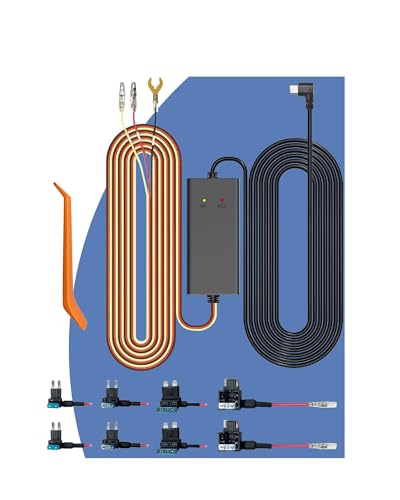
USB-C Hardwire Kit with 4 Fuse Tap Sets
★★★★★ 4.3 / 5 Best fuse-tap variety
Fuse boxes vary from car to car, and the reason to pick this one is that it bundles four fuse-tap styles so you are far less likely to open the panel and find nothing fits. It keeps ACC-based 24-hour parking mode and low-voltage protection, and the listing calls out compatibility with common cameras like Redtiger, Wolfbox, and Vanture.
Connector USB-C outputInstall type Fuse-tap hardwire, four tap setsBattery care Low-voltage cutoff built inExtras ACC 24-hour parking mode
- Four fuse-tap styles fit more fuse boxes
- ACC parking mode with low-voltage cutoff
- Listed as compatible with several camera brands
- USB-C only, no adapter for other ports
- Cutoff threshold is fixed
Best for: an install where you are not sure which fuse tap your car needs
Mini USB Dash Cam Hardwire Kit
★★★★★ 4.3 / 5 Best for mini-USB cameras
Plenty of well-loved cameras still use a mini USB port, and this is a simple, honest kit for exactly those. It is a no-frills fuse-tap hardwire cable with the mini USB connector many older and budget dash cams rely on, so it is the pick to reach for when a newer USB-C kit simply will not plug in.
Connector Mini USB outputInstall type Fuse-tap hardwire with fuseBattery care Check camera for parking-mode cutoffBest match Older and budget mini-USB cameras
- Fits older cameras that use mini USB
- Straightforward, no-frills hardwire setup
- Includes the fuse needed to tap in
- Mini USB only, will not fit USB-C cameras
- Fewer battery-protection extras than newer kits
Best for: keeping an older mini-USB dash cam powered for parking mode
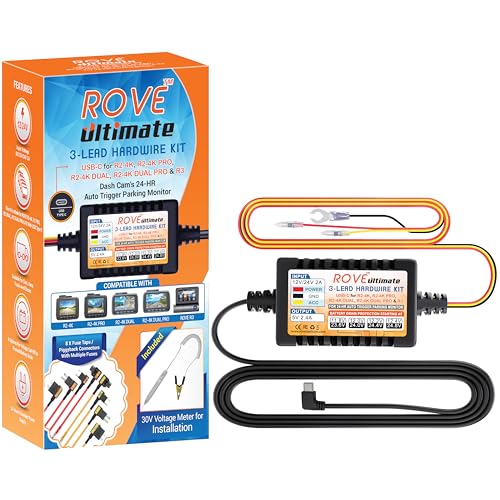
ROVE Ultimate USB-C Hardwire Kit
★★★★★ 4.3 / 5 Best brand-matched pick
If you already run a ROVE camera, matching it with the brand's own USB-C kit takes the guesswork out of connector fit and parking-mode behavior. It is built for 24-hour parking monitoring and uses the USB-C port found on recent ROVE models, which is the simplest way to be confident the cable and camera are designed to work together.
Connector USB-C outputInstall type Fuse-tap hardwireBattery care Supports 24-hour parking monitoringBest match Recent ROVE dash cameras
- Made to match ROVE cameras directly
- USB-C fits recent ROVE models
- Built for 24-hour parking monitoring
- Most useful only if you own a ROVE camera
- Fewer adjustable settings than some rivals
Best for: ROVE camera owners who want a guaranteed connector match
A dash camera cable kit is what turns a camera that only runs on a cigarette-lighter plug into one wired neatly into the car, with the socket left free and the cable hidden. The right kit depends on three things: whether you want parking mode, which connector your camera uses, and how comfortable you are tapping a fuse. The picks below cover clean USB-C hardwire kits, an OBD-II plug-in for a fast fit, and a legacy mini-USB option, so you can match a kit to your camera rather than guess from the shelf.
Hardwire kit for parking mode, or a simple USB extension
The first decision is what you actually want the cable to do. A USB extension cable only relocates the lighter plug to a tidier spot, and most sockets cut power the moment the engine is off, so the camera stops with it. That is fine if you only record while driving. A hardwire kit is the choice when you want parking mode, because it wires the camera into a live circuit so it can keep watching a parked car. It also frees the lighter socket for other use. Every USB-C and OBD-II kit above is built for this, so start by deciding whether parked recording matters to you.
Match the connector: mini, micro, or USB-C
A kit only helps if its plug fits your camera, and this is where buyers most often go wrong. Recent cameras almost all use USB-C, plenty of older and budget models use mini USB, and some use micro USB. Look at the port on your camera before you buy, because a USB-C cable simply will not seat in a mini-USB camera. If your camera is older, the mini USB kit is the honest answer. If you are unsure, or you expect to replace the camera before long, the 3-in-1 kit with micro, mini, and USB-C tips removes the risk of buying the wrong connector twice.
Fuse tap that fits, and a cutoff that protects the battery
For a hardwire install the two things that make or break it are the fuse tap and the low-voltage cutoff. Fuse boxes use different fuse shapes, so a tap has to match what is in your panel; kits that bundle several tap styles, like the four-set option above, save you from opening the box and finding nothing fits. The cutoff is what stops parking mode from flattening the battery. A fixed threshold is fine for a healthy battery, but an adjustable kit lets you set a higher cutoff for an older or smaller one, and an on-cable voltage readout takes the guesswork out. If you leave parking mode on overnight, treat this as the feature that matters most.
Cable length and tucking it out of sight
Length is easy to overlook and annoying to get wrong. You want enough cable to route from the fuse box or OBD-II port, along the trim, and up to a windshield-mounted camera, with slack to tuck rather than leave dangling. A run of roughly 11 to 13ft suits most cars and is why several picks here land in that range. Err longer if you drive a larger vehicle or plan a rear-camera run, since spare cable disappears neatly into the headliner while a cable that is too short forces an ugly compromise. A little planning of the route before you start makes the whole install look factory-fitted.
Questions people ask
What is a dash camera cable kit and why would I need one?
A dash camera cable kit powers your camera from the car itself instead of a cigarette-lighter socket, so the socket stays free and the cable hides out of sight. Most kits either tap a fuse in the fuse box or plug into the OBD-II port, then run a slim wire up to the camera. The main reason to fit one is parking mode, which needs constant power that a lighter plug cannot always provide.
Should I choose a hardwire kit or a USB extension cable?
A USB extension cable just moves the plug to a tidier spot but still relies on the lighter socket, which usually cuts power when the engine is off. A hardwire kit wires the camera into the car so it can keep recording in parking mode, and it frees up the socket. If you only want the camera on while driving, an extension is fine; for parking protection, choose a hardwire kit.
How does a hardwire kit protect my car battery?
Good kits include low-voltage protection, which watches the battery voltage and cuts power to the camera before the battery drops too low to start the car. Some kits use a single fixed threshold, while others let you pick from several levels so you can set a higher cutoff for an older or weaker battery. This is the single most important feature for anyone leaving parking mode on overnight.
What connector does my dash camera use?
Most recent cameras use USB-C, many older or budget models use mini USB, and some use micro USB. Check the port on your camera before buying, since a USB-C kit will not fit a mini USB camera. If you are not sure or plan to upgrade later, a 3-in-1 kit that includes micro, mini, and USB-C tips covers all three so you are not caught out.
Do I need to match the fuse tap to my car?
Yes. Fuse boxes use different fuse shapes such as low-profile mini, mini, standard, and micro2, and the tap has to match the fuses in your panel. Some kits include several tap styles so you are covered whatever your car uses. If a kit only ships one style, check your fuse box first or pick a kit with multiple tap sets to avoid a second trip.
How long should the cable be?
Longer is usually better because you tuck the slack into the headliner and along the pillar trim rather than leaving it loose. A run of around 11 to 13ft suits most cars and gives room to route neatly from the fuse box up to a windshield-mounted camera. For a larger vehicle or a rear camera run, err toward the longer end so you are not left short.
Can I install a dash camera cable kit myself?
Many drivers do. A plug-and-play OBD-II kit is close to effortless and takes only a couple of minutes. A fuse-tap hardwire kit is more involved but still manageable with a fuse puller and a little patience, since it means finding a suitable fuse, fitting the tap, and grounding the wire. If you are not comfortable working near the fuse box, a shop can fit one quickly.
How did we choose the dash camera cable kits in this guide?
We compared connector type, install method, battery-protection features, cable length, and how well each kit suits a real situation such as a quick plug-in fit, an older camera, or an unknown fuse box. Every product shown is a real listing, and these are our chosen picks based on that comparison rather than lab-tested claims.
The bottom lineSo which one?
The Gebildet Type-C Dash Cam Hardwire Kit is our top choice for a clean, hidden install that suits most current cameras, with low-voltage protection and enough cable to route neatly, while the OBD2 to USB-C cable is close behind when you want the fastest possible fit with no fuse work. Let your camera's connector, your comfort with the fuse box, and whether you need parking mode lead the decision, and treat low-voltage protection as the feature to insist on if you plan to leave the camera recording while parked.