Coding robots turn abstract programming ideas into something a child can watch move across the floor, and that is exactly why they have become such a popular on-ramp into STEM. The best ones meet a child where they are: a five-year-old can start by tapping a few buttons or drawing a path, while an older kid can write real code that controls motion, lights and sensors. The challenge for parents and teachers is that these robots differ a lot in age fit, in whether they need a screen, and in how deep the coding actually goes.
This roundup gathers coding robots that are currently listed on Amazon and sorts them by who they suit best. These are editorial picks based on the makers' current product listings rather than lab trials, so treat the age ranges and feature lists below as listing claims you can verify on the product page. Our goal is to help you match a robot to a child's age and your home or classroom setup, not to promise any particular learning result. Think of all of these as fun STEM learning tools.
How we chose these coding robots
We looked for a spread of robots that together cover the real range of needs families have. That meant including at least one strong screen-free option for young children, a couple of app-based robots that scale up to text coding for older kids, a value choice, and a pick aimed at classrooms. We leaned on the age ranges and coding methods stated in each listing, and we favored robots that are clear about what they do and what device, if any, they require. Because platforms and apps change, we also flag where a robot depends on a companion app so you can check that it still fits your devices before buying.
The coding robots we recommend
Each pick below notes the listed age range, whether it is screen-free or app-based, and how a child actually codes it. Use the badges as a quick guide to which situation each robot fits.
Wonder Workshop Dash: our top pick
Dash is the robot we would hand to most new coders around ages 6 and up. The companion app uses block coding, so a child drags and drops commands and immediately sees Dash respond in the real world. It is listed as voice-activated and programmable, which gives younger kids an easy first win and room to build longer programs later. The main thing to plan for is that Dash needs a compatible tablet or phone to run its app.
Learning Resources Botley: best screen-free choice
For families who want coding without a screen, the Botley activity set is a clean fit. It is listed for ages 5 and up and includes 77 pieces, and kids program it using a handheld remote and coding cards rather than an app. The accessory and obstacle pieces give beginners small missions to solve, which keeps early coding playful. Because there is no app, there is nothing to install and no device to share.
Sphero Bolt+: best app-based robot
When the app experience is the point, Sphero Bolt+ offers the most range here. It is a rolling robot ball you drive and program through the Sphero app, which supports block coding and then opens up text-based JavaScript as a child advances. That makes it well suited to older kids and teens who want their code to control motion, lights and sensors. As with other app robots, it needs a compatible tablet or phone over Bluetooth.
Teach Tech Mech 5: best for older kids
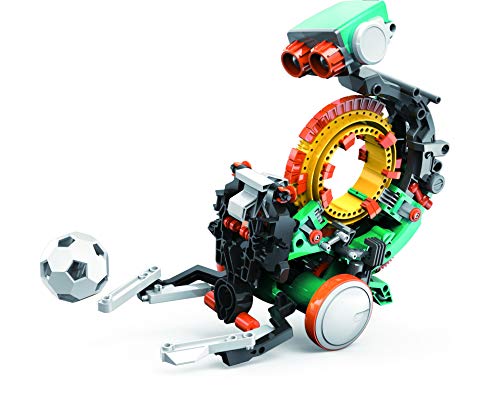
Mech 5 is listed for ages 10 and older and takes a mechanical route to coding. Instead of an app, kids set a physical coding wheel to sequence actions such as throwing, lifting, kicking and drawing. It stays screen-free while still teaching planning and sequencing, and the build itself adds an engineering project for kids who enjoy assembling as much as programming. It is a narrower idea of coding than the app platforms, but a satisfying one for the right builder.
Sphero Mini: best value
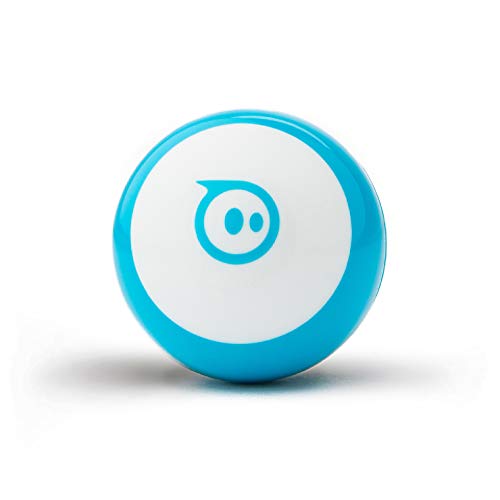
Sphero Mini brings app-based coding in a smaller, simpler package. It is listed for ages 8 and up, connects over Bluetooth, and runs through the Sphero app with driving, block coding and a path up to JavaScript. For many kids and teens it covers most of what the larger app robots do with a lighter footprint, which makes it an easy and affordable way into Sphero-style programming.
Ozobot Evo: best for classrooms
Ozobot Evo is built with teachers in mind and is listed for ages 5 to 11. Its standout feature is that kids can code it two ways: screen-free using color-code markers drawn on paper, or with block coding through an app. That flexibility suits a classroom where some students start on paper and others move into the app, and the wide age span lets a single kit stretch across several grade levels.
How to choose a coding robot
Start with the age range. The listed age is the first filter. A robot aimed at ages 5 and up asks for very different skills than one listed for ages 10 and older, and matching the age range keeps a child engaged rather than frustrated or bored. When a kit lists a wide span, such as ages 5 to 11, it is usually designed to grow with the child.
Decide screen-free versus app-based. Screen-free robots like Botley and the mechanical Mech 5 use remotes, cards or wheels, so there is no device to share and no app to manage. App-based robots like Dash, Sphero Bolt+ and Sphero Mini unlock deeper features but need a tablet or phone. Some robots, like Ozobot Evo, offer both a screen-free mode and an app mode.
Look at the coding method. Younger kids do well with physical cards, buttons or color codes. Block coding, where kids snap visual blocks together in an app, is the common middle step. More advanced robots add text coding such as JavaScript, which is where older kids and teens can keep growing. Picking the right method matters more than the robot's looks.
Check what device is needed. If a robot is app-based, confirm it supports the tablet or phone you already own before you buy. App availability, features and any optional subscriptions can change over time, so it is worth checking the current product page and app store listing.
Weigh durability for young kids. Younger children are hard on toys, so sturdier builds and simple controls tend to last longer in little hands. Sets with replaceable accessories, like color-code markers, are easy to top up when pieces wear out.
Think about expandability and setting. Some robots stay simple on purpose, while others scale from blocks up to text code and add sensors and accessories. If you are buying for a classroom, favor robots that work across a range of ages and support more than one way to code, so one kit can serve many students. For a single child at home, matching the robot to that child's age and interests matters most.
A note on age and apps
Always match the robot to the child using the age range on its listing, since these toys are designed for specific stages. Several of the app-based picks here need a companion app running on a compatible tablet or phone, and app or subscription availability can change at any time, so confirm the current requirements before buying. We describe these robots as fun STEM learning tools and make no promises about developmental outcomes.
The bottom line
If you want one easy answer, the Wonder Workshop Dash is the most well-rounded coding robot for a typical grade-schooler. Choose the Botley activity set for screen-free play with younger kids, step up to Sphero Bolt+ or Sphero Mini when a child is ready for app coding, pick Teach Tech Mech 5 for an older hands-on builder, and consider Ozobot Evo when a kit needs to work across a classroom. Match the age range, decide how much screen you want, and you will land on the right robot for your child.