Scanners
Top Artwork Scanners for Artists and Photographers
7 picks compared
6 min read
ProductPickly is reader-supported. When you buy through links on our site, we may earn an affiliate commission at no extra cost to you. It never changes our picks.
The short answerThe Epson Perfection V600 is the best overall for artwork, delivering excellent color and detail. The Canon CanoScan LiDE 400 is a top budget choice, while the Epson Expression 12000XL excels for large format and fine art reproduction.
?How we pickedWe compare published specifications, safety certifications and thousands of verified owner reviews, and we do not physically test every unit. Read the full process in our review methodology.
Epson Perfection V600
★★★★★ 4.8 / 5 Best Overall
The Epson Perfection V600 offers 6400 dpi optical resolution, capturing fine details in artwork. It scans both reflective and transparent materials, making it perfect for slides and negatives. Built-in Digital ICE technology removes dust and scratches automatically.
Optical Resolution 6400 dpiColor Depth 48-bitScan Area 8.5 x 11.7 inchesInterface USB 2.0
- High resolution for fine art
- Transparency unit included
- Good dynamic range
Canon CanoScan LiDE 400
★★★★★ 4.7 / 5 Best Budget
The Canon CanoScan LiDE 400 is a slim, lightweight scanner ideal for artists on a budget. It offers 4800 dpi resolution and a four-button design for easy operation. Its LED light source requires no warm-up time and consumes little power.
Optical Resolution 4800 dpiColor Depth 48-bitScan Area 8.5 x 11.7 inchesInterface USB 2.0
- Very affordable
- Space-saving design
- Easy to use
- No transparency unit
- Plastic build
Epson Expression 12000XL
★★★★★ 4.7 / 5 Best for Large Format
The Epson Expression 12000XL scans up to 12.2 x 17.2 inches, handling larger artwork in one pass. It delivers 2400 dpi resolution with high optical density for deep blacks and subtle highlights. This scanner is a staple in professional studios and archives.
Optical Resolution 2400 dpiColor Depth 48-bitScan Area 12.2 x 17.2 inchesInterface USB 2.0, FireWire
- Large scan area
- High optical density
- Professional-grade quality
Best for: Best for Large Format
Plustek OpticPro A320L
★★★★★ 4.5 / 5 Best for Oversized Art
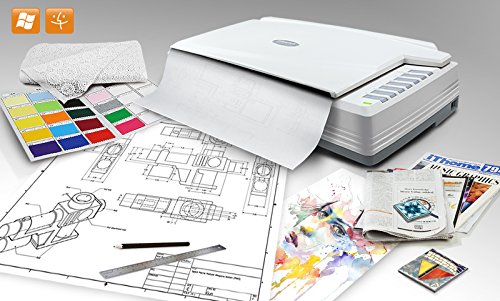
The Plustek OpticPro A320L scans A3-sized artwork up to 12 x 17 inches. It offers 3200 dpi resolution and a CCD sensor for accurate color reproduction. This model is a cost-effective alternative to high-end large-format scanners.
Optical Resolution 3200 dpiColor Depth 48-bitScan Area 12 x 17 inchesInterface USB 2.0
- A3 scan area at lower price
- Good color accuracy
- Sturdy build
- No transparency unit
- Slow scan speed
Best for: Best for Oversized Art
Canon imageFORMULA R40
★★★★★ 4.6 / 5 Best for Quick Batch Scanning
The Canon imageFORMULA R40 is a compact sheet-fed scanner that handles up to 60 pages per minute. It scans both sides simultaneously, making it ideal for digitizing collections of flat artwork like prints. Its ultrasonic double-feed detection prevents jams.
Optical Resolution 600 dpiColor Depth 24-bitScan Area 8.5 x 14 inchesInterface USB 3.2
- High speed
- Duplex scanning
- Compact size
- Not for thick or fragile art
- Lower resolution
Best for: Best for Quick Batch Scanning
Epson Perfection V39
★★★★★ 4.5 / 5 Best for Simple Home Use
The Epson Perfection V39 is a basic flatbed scanner with 4800 dpi resolution. It is lightweight and easy to set up, perfect for artists who need occasional scans. Its compact design fits easily on a desk or shelf.
Optical Resolution 4800 dpiColor Depth 48-bitScan Area 8.5 x 11.7 inchesInterface USB 2.0
- Affordable
- Simple operation
- Portable
- No automatic document feeder
- Limited software features
Best for: Best for Simple Home Use
Plustek OpticSlim A3 Flatbed Scanner
★★★★★ 4.4 / 5 Best for Archival Quality
The Plustek OpticSlim A3 offers 600 dpi resolution and a large A3 scan area. It is designed for archival digitization with high color fidelity and low distortion. This scanner is often used by libraries and museums.
Optical Resolution 600 dpiColor Depth 48-bitScan Area 12 x 17 inchesInterface USB 2.0
- Excellent color accuracy
- A3 size
- Durable construction
- Low resolution for fine art
- Expensive
Best for: Best for Archival Quality
Resolution and Color Depth
Optical resolution determines how much detail a scanner can capture. For artwork, aim for at least 4800 dpi to see fine brushstrokes and textures. Color depth, measured in bits, affects how many colors the scanner can reproduce. A 48-bit depth provides smoother gradients and better shadow detail. Higher numbers are better, but they also create larger files. Balance resolution with your storage capacity.
Scan Area and Media Types
Consider the largest artwork you plan to scan. Flatbeds typically handle up to letter size, while A3 models accommodate bigger pieces. If you scan thick or fragile items, a flatbed is safer than a sheet-fed scanner. Some scanners include transparency units for slides and negatives. Check if the scanner can handle your media types without damage.
Speed and Workflow
Scanning a single piece is quick, but digitizing a whole portfolio takes time. Sheet-fed scanners offer high speed, but they may not handle thick or irregular art. Flatbeds are slower but more versatile. Look for features like automatic document feeders or batch scanning to speed up repetitive tasks. Software that auto-crops and straightens images can save editing time.
Build Quality and Software
A sturdy scanner reduces vibrations that blur scans. Metal parts and a solid lid are signs of durability. Bundled software should offer color correction and dust removal. Some models include advanced features like Digital ICE. Check compatibility with your operating system. Read owner reviews to learn about real-world reliability.
Questions people ask
What is the best resolution for scanning artwork?
For most artwork, 4800 dpi is sufficient to capture fine details. If you plan to enlarge prints significantly, consider 6400 dpi. Higher resolutions create large files, so balance quality with storage.
Can I scan large paintings with a home scanner?
Flatbeds have limited scan areas, typically up to A3. For larger pieces, you may need to scan in sections and stitch them with software. Alternatively, use a camera-based setup for oversized artwork.
Is a sheet-fed scanner good for artwork?
Sheet-fed scanners are fast but can damage thick or fragile pieces. They are best for flat prints and documents. For original paintings or textured art, a flatbed is safer.
What is the difference between CCD and CIS scanners?
CCD sensors offer better depth of field and color accuracy, ideal for artwork. CIS sensors are thinner and use less power but may not capture textures as well. For fine art, choose CCD.
How do I scan artwork without losing color accuracy?
Use a scanner with high color depth, like 48-bit. Calibrate your monitor and scanner for consistent results. Scan in RAW or TIFF format to preserve data. Avoid JPEG for archival purposes.
Can I scan slides and negatives with a flatbed scanner?
Some flatbeds include a transparency unit for scanning slides and negatives. Models like the Epson Perfection V600 have this feature. Check the specs before buying if you need it.
Is it worth buying a professional scanner for artwork?
If you sell prints or need archival quality, a professional scanner like the Epson Expression 12000XL is worth the investment. For casual use, a mid-range flatbed may suffice.
What is the best scanner for scanning large format art?
The Epson Expression 12000XL and Plustek OpticPro A320L handle up to A3. For larger pieces, consider a wide-format scanner or use a camera with a copy stand.
The bottom lineSo which one?
Choose the Epson Perfection V600 for a balance of quality and value. For large or professional work, the Epson Expression 12000XL is unmatched. Budget-conscious artists should start with the Canon CanoScan LiDE 400.