A USB microphone is the fastest way to sound clearer on a stream, a podcast, or a work call without wiring up an audio interface or learning a mixer. You plug it in, your computer recognizes it, and your voice jumps ahead of a laptop's built-in mic. The catch is that USB microphones are not interchangeable. A dynamic capsule built for a noisy gaming desk behaves very differently from an omnidirectional condenser meant to capture a whole meeting room, and the wrong match can leave you either too quiet or buried under keyboard clatter and room echo.
This guide is an editorial roundup of USB microphones drawn from current Amazon listings. We did not record with these units or run a lab bench on them. Instead, we read the product pages closely, grouped the microphones by what they are actually built to do, and matched each one to a clear use case so you can pick by job rather than by marketing. Every pick below is a real listing with its own strengths, and we flag the trade-offs in plain language.
How we evaluated these microphones
We started with the job, not the spec sheet. Gaming and streaming reward a microphone that ignores background noise and sits on a boom arm within easy reach. Conference calls reward wide, even pickup so nobody at the table gets lost. Podcasting rewards onboard monitoring and clean gain control. From there we sorted the listings by capsule type (dynamic versus condenser), connection (USB only versus a USB and XLR hybrid), polar pattern, onboard controls, and how each one mounts. Polar pattern, sample-rate and bit-depth figures, and noise-cancellation features are quoted from the manufacturer listings, so we treat them as listing claims rather than measured results. Where a microphone makes a bold claim, we say so and let you weigh it. The order below reflects how broadly useful each pick is for a typical creator, caller, or podcaster, not any ranking of price.
Our top picks: USB microphones
1. FIFINE AmpliGame AM8 (Top Pick)
The FIFINE AmpliGame AM8 earns the top spot because it does the most jobs well with the fewest compromises. It is a dynamic microphone, which means the capsule is built to pick up what is close to it and shrug off what is not, so an untreated bedroom, a mechanical keyboard, and a nearby PC fan are far less likely to sit on top of your voice. The listing pairs that capsule with both a USB output for instant plug and play and an XLR output for the day you add an audio interface, which is why it works as a first microphone and still has somewhere to grow. Onboard level and mute control, per the listing, keep you from diving into software mid stream. It is aimed squarely at gaming and streaming, but the same qualities make it a dependable talk microphone for almost anyone.
2. Shure MV6 USB Gaming Microphone (Best for Streaming)
If streaming and recording are the whole point of the purchase, the Shure MV6 is the pick to stretch for. Shure is a long established microphone brand, and this model is a dynamic USB microphone positioned specifically for streamers and creators who want a polished, broadcast style voice without an interface. A dynamic capsule again does the heavy lifting of keeping the room out of your audio, and the listing leans on headphone monitoring so you can hear yourself as your audience does. It is a more premium option than most of this list, so it suits someone who has decided streaming is a serious habit rather than an experiment.
3. FIFINE AmpliGame AM8T (Best USB/XLR Hybrid)
The AM8T is the AM8 idea sold as a complete set. It is a dynamic PC microphone with both XLR and USB outputs, so it is the clearest expression of the hybrid upgrade path in this guide: start on USB with zero extra gear, then move to the XLR side when you add a mixer or interface and keep the same microphone. The set packaging makes it a strong single box purchase for a desk that does not have a stand yet, and the dynamic capsule keeps background noise down the same way the AM8 does. Choose it over the AM8 when you want the bundle and the explicit plan to grow into XLR gear later.
4. TONOR Conference USB Microphone G11 (Best for Conference)
Meetings break most microphones because the people talking are rarely the same distance from the capsule. The TONOR G11 is built for exactly that. It is an omnidirectional condenser, meaning it is designed to hear the whole table more or less evenly rather than favoring one seat, and omnidirectional pickup is the right tool when three or four voices need to land at a usable level. It connects over USB for plug and play on a laptop in a huddle room. The flip side of that wide, sensitive pickup is that it will also collect room echo and side chatter, so it rewards a reasonably quiet space rather than a busy open office.
5. ZealSound Podcast Microphone (Best for Podcasting)
The ZealSound leans into the controls a podcaster actually touches. Its listing spells out onboard gain, a volume adjustment, a mute button, and real time monitoring with an echo feature, which is a meaningful list for anyone recording longer talk sessions where you want to set a level once and watch it rather than fight software. It connects by USB and the listing notes broad compatibility across computers and mobile devices, which helps if you record on more than one setup. For solo or two person podcasts where hearing yourself cleanly matters, the monitoring and gain controls are the draw.
6. JOUNIVO USB Microphone (Best Budget)
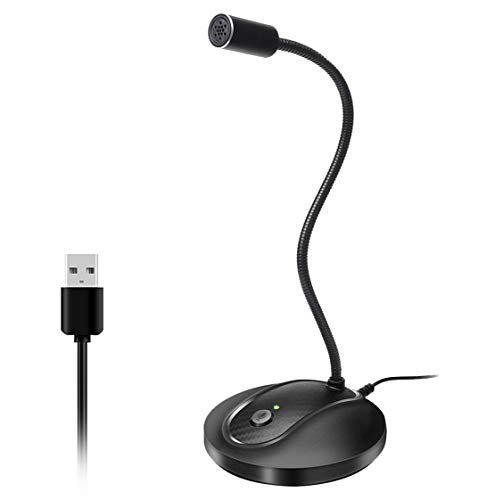
The JOUNIVO gooseneck is the simple, get started option. The headline of its listing is a 360 degree adjustable gooseneck, a mute button with an LED indicator, noise canceling technology, and true plug and play across Windows and macOS. That is a sensible feature set for someone who mainly needs to be heard clearly on calls, voice chat, or dictation and does not want to think about mounts or software. The gooseneck lets you position the capsule close to your mouth on a desk without an arm. It is the least specialized microphone here, which is the point: it is the low commitment way to upgrade off a laptop mic.
7. CMTECK USB Computer Microphone G009 (Best for Video Calls)
The CMTECK G009 is built around one promise its listing puts front and center: noise canceling capture with a mute function for online chatting, calls, and casual recording on a PC or laptop. It is a desktop microphone meant to sit in front of you for Skype, meetings, and the occasional YouTube or podcast session. Treat the noise canceling language as a listing claim rather than a guarantee, and set your expectations around clear voice capture for calls rather than studio production. For a tidy desk that mainly needs to sound better in meetings, it is an easy, uncomplicated choice.
What to look for in a USB microphone
Dynamic versus condenser. This is the first fork. A dynamic microphone is less sensitive by design, so it captures what is close and rejects much of the room, which makes it the safer pick for an untreated space with a fan, a keyboard, or traffic outside. A condenser is more sensitive and more detailed, which flatters a quiet, controlled room but will also happily record the echo and background you did not want. If your room is not treated, lean dynamic.
Polar pattern for solo versus group. A cardioid style pattern listens mostly to the front and is what you want for one person talking into the microphone. An omnidirectional pattern, like the TONOR conference pick, listens all around and is what you want when several people share one microphone. Matching the pattern to the number of voices matters more than almost any other spec.
USB only versus a USB and XLR hybrid. A USB only microphone is simpler and cheaper to live with. A hybrid such as the FIFINE AM8 or AM8T adds an XLR output, which is an upgrade path: you can start on USB today and, if you later add an audio interface or mixer, keep the same microphone and move to the XLR side. If you suspect your setup will grow, the hybrid saves you buying twice.
Onboard controls and monitoring. Buttons you can reach matter more than they sound like they should. A physical mute saves you in a meeting or a live stream, a gain control sets your level without digging through menus, and a headphone jack for real time monitoring lets you hear yourself the way listeners do, which is the single best habit for catching problems early.
Stand versus boom arm. A desk stand is fine and included with many of these, but it sits the microphone low and can pick up desk thumps. A boom arm floats the microphone near your mouth, clears your workspace, and keeps a dynamic capsule close enough to do its noise rejecting job. Several picks here are ready for an arm if you add one.
Room noise and your use case. Be honest about your room and your job. For gaming and streaming in a normal room, a dynamic cardioid microphone on an arm is the reliable answer. For conference calls with a group, an omnidirectional condenser is purpose built. For podcasting, prioritize monitoring and clean gain so you can set a level and trust it. Picking for the room you actually have beats picking for the spec sheet every time.
A note on claims
Polar patterns, bit depth and sample rate figures, and noise cancellation features throughout this guide are taken from the manufacturers' product listings, not from independent measurement. As a practical rule, dynamic microphones reject room noise well and are the forgiving choice for untreated rooms, while condensers are more sensitive and reward a quiet, treated space. A USB and XLR hybrid gives you an upgrade path so you are not locked into USB forever. Use those principles to sanity check any listing claim before you buy.
The bottom line
For most people the FIFINE AmpliGame AM8 is the sensible starting point: a dynamic capsule that handles a real room, plus an XLR output for later. Dedicated streamers can step up to the Shure MV6, groups on calls should reach for the omnidirectional TONOR G11, podcasters will appreciate the ZealSound controls, and anyone who just needs to sound better on calls can start with the JOUNIVO or CMTECK. Match the microphone to your room and your job, and a USB microphone is one of the easiest upgrades you can make.