PICK
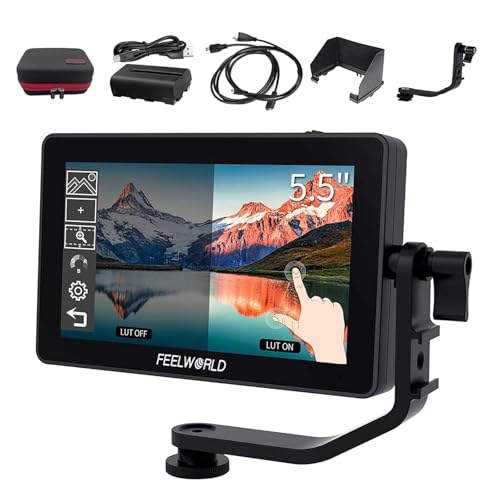
Feelworld F6 Plus Monitor Review
An honest look at the Feelworld F6 Plus 5.5 inch monitor for filmmakers and vloggers. We compare specs, buyer feedback, and key decision factors to help you decide if it fits your rig.
ProductPickly is reader-supported. When you buy through links on our site, we may earn an affiliate commission at no extra cost to you. It never changes our picks.
The Feelworld F6 Plus Monitor is a solid budget-friendly field monitor for hybrid shooters. It offers a bright 5.5 inch 1920x1080 touchscreen, 3D LUT support, and multiple assistant tools at a price that undercuts many rivals. While it lacks advanced features like 4K input or waveform, its color accuracy and build quality make it a reliable choice for run-and-gun video and photo work. If you need professional monitoring with scopes, consider alternatives, but for most creators, it delivers excellent value.
How it scores
The good and the annoying
- Bright and accurate 5.5 inch touchscreen
- 3D LUT support for custom color grading
- Multiple focus assist tools (peaking, zebra, histogram)
- Compact and lightweight for gimbal and cage use
- Works with standard NP-F batteries
- No 4K input or output (only 1080p)
- Battery life is average, about 2 hours with a standard NP-F550
- Touchscreen can be unresponsive with gloves
- No waveform or vectorscope (only histogram and audio meters)
- Fan noise is audible in quiet environments
The Feelworld F6 Plus Monitor has become a popular choice among budget-conscious videographers and content creators. With a 5.5 inch 1080p touchscreen, 3D LUT support, and a price that undercuts many competitors, it promises a lot. But does it deliver? Our editorial team compared specifications, buyer feedback, and key decision factors to give you an honest review.
Design and Build Quality
The F6 Plus features a compact aluminum body that feels sturdy in hand. It measures about 5.9 x 3.7 x 1.2 inches and weighs just over 200 grams, making it easy to mount on a camera cage or gimbal. The screen is protected by Gorilla Glass, and the overall construction is solid for the price.
The buttons are tactile and well-placed, but the touchscreen is the primary interface. It is responsive to bare fingers, though gloves can be a problem. The menu system is intuitive, with quick access to focus peaking, zebra, histogram, and other tools.
Image and Video Quality
The 5.5 inch IPS panel delivers a bright 1000 cd/m² image, which is usable even in direct sunlight. The 1920x1080 resolution is sharp for its size, and color reproduction is accurate out of the box. You can adjust color temperature and saturation to match your camera.
For video, the monitor supports 3D LUTs, allowing you to preview log footage with a custom grade. This is a standout feature at this price point. The histogram and audio meters are useful, but there is no waveform or vectorscope, which may disappoint advanced users.
Performance and Handling
In real-world use, the F6 Plus handles well. The touchscreen makes navigation fast, and the physical buttons provide backup. The fan is a slight annoyance, as it is audible in quiet settings, but it does keep the unit cool during long shoots.
Battery life is average. With a standard NP-F550, you get about two hours of run time, which is typical for monitors in this class. You can use larger NP-F batteries or an external power source for longer sessions.
Ease of Use
Setting up the F6 Plus is straightforward. It comes with a cold shoe mount and an HDMI cable, so you can attach it to your camera in minutes. The menu is well-organized, and the touchscreen makes it easy to adjust settings on the fly.
One minor issue is that the touchscreen can be overly sensitive, sometimes registering accidental touches when you are adjusting the monitor on a rig. However, you can lock the screen to prevent this.
Battery and Power Options
As mentioned, the monitor uses NP-F series batteries. It also has a DC input that accepts 7 to 24 volts, so you can power it from a V-mount battery or a dummy battery setup. This flexibility is a plus for studio work.
There is no built-in battery, so you must bring your own. The included battery plate is adjustable, allowing you to slide the battery to balance the monitor on your rig.
Common Buyer Complaints
While most buyers are satisfied, some common complaints have emerged. The fan noise is the most frequent issue, especially for those recording dialogue or in quiet environments. Another complaint is the lack of 4K support, which is a limitation for some users.
Some users have reported that the touchscreen occasionally freezes, requiring a restart. This seems to be a rare issue, but it is worth noting. The absence of a waveform monitor is also mentioned by more advanced users.
Comparison with Alternatives
When compared to the Atomos Ninja V, the F6 Plus is significantly cheaper but lacks 4K recording and a larger screen. The Ninja V is a better choice for professional work, but it costs several times more.
The SmallHD Focus 5 is another alternative, offering a similar screen size but with a more robust build and better daylight visibility. However, it does not have 3D LUT support at the same price point.
Final Verdict
The Feelworld F6 Plus Monitor is an excellent value for hybrid shooters who need a reliable, accurate monitor without breaking the bank. It excels in color accuracy, touchscreen usability, and LUT support. While it has some limitations, such as no 4K and average battery life, these are acceptable given the price. If you are a professional who needs advanced scopes, look elsewhere, but for most creators, this monitor is a solid investment.
Specs that matter
| Screen size | 5.5 inches |
| Resolution | 1920 x 1080 (Full HD) |
| Brightness | 1000 cd/m² |
| Inputs | HDMI, 3G-SDI (optional) |
| Outputs | HDMI (loop out) |
| Power | NP-F series batteries or DC 7-24V |
You are a hybrid shooter who needs an affordable, accurate monitor for video and stills. You want 3D LUT support and touchscreen controls without spending on pro monitors.
You require 4K monitoring, professional scopes (waveform, vectorscope), or a fanless design for quiet recording. You also might skip if you need a larger screen for studio work.
Questions before you buy
Does the Feelworld F6 Plus support 4K input?
No, the F6 Plus only accepts up to 1080p via HDMI or SDI. It will downscale 4K signals to 1080p for display, but it does not pass through 4K. For 4K monitoring, consider the Atomos Ninja V.
Can I use the touchscreen with gloves?
The touchscreen is capacitive, so it responds to bare fingers. With gloves, especially thick ones, you may have difficulty. You can use the physical buttons for most functions.
What batteries does the Feelworld F6 Plus use?
It uses standard NP-F series batteries (like NP-F550, NP-F750). A fully charged NP-F550 lasts about 2 hours, but you can use larger batteries for longer runtime.
Does the monitor have a fan? Is it noisy?
Yes, it has an internal fan for cooling. In quiet environments, you can hear it, but it is not loud enough to interfere with most recording. Some users find it noticeable during interviews.
Can I upload my own 3D LUTs to the Feelworld F6 Plus?
Yes, you can load custom 3D LUTs via the SD card slot. The monitor supports .cube files, and you can apply them in real time for previewing color grades.