Surveillance and Security Cameras
Best Indoor Security Cameras: Top Picks for Home
7 picks compared
6 min read
ProductPickly is reader-supported. When you buy through links on our site, we may earn an affiliate commission at no extra cost to you. It never changes our picks.
The short answerThe best indoor security cameras are the Wyze Cam v4 for budget, the Ring Indoor Cam (2nd Gen) for smart home users, and the Google Nest Cam (Indoor, Battery) for flexibility.
?How we pickedWe compare published specifications, safety certifications and thousands of verified owner reviews, and we do not physically test every unit. Read the full process in our review methodology.
Wyze Cam v4
★★★★★ 4.7 / 5 Best overall
The Wyze Cam v4 offers 2K QHD video with color night vision. It has a built-in spotlight and siren for deterrence. Owners praise its crisp footage and low price.
Resolution 2K QHDField of view 120 degreesStorage MicroSD card, cloudPower Wired
- Excellent video quality for the price
- Color night vision
- Local storage option
- Requires subscription for some features
- No battery option
Ring Indoor Cam (2nd Gen)
★★★★★ 4.6 / 5 Best for Alexa users
The Ring Indoor Cam (2nd Gen) gives 1080p HD video with two-way talk. It works seamlessly with Alexa routines. Owners like the simple setup and reliable app.
Resolution 1080p HDField of view 120 degreesStorage Cloud subscriptionPower Wired
- Deep Alexa integration
- Compact design
- Easy setup
- Requires Ring Protect plan for recording
- No local storage
Best for: Best for Alexa users
Google Nest Cam (Indoor, Battery)
★★★★★ 4.5 / 5 Best for flexibility
The Google Nest Cam (Indoor, Battery) runs on battery or wired power. It offers 1080p HDR video with intelligent alerts. Owners value the magnetic mount and optional subscription.
Resolution 1080p HDRField of view 135 degreesStorage Cloud subscriptionPower Battery or wired
- Battery or wired power
- Smart alerts
- Magnetic mount
- Expensive
- Subscription needed for continuous recording
Best for: Best for flexibility
TP-Link Tapo C210
★★★★★ 4.5 / 5 Best value
The TP-Link Tapo C210 offers 2K QHD video with pan and tilt. It has a microSD slot for local storage without fees. Owners report smooth panning and good night vision.
Resolution 2K QHDField of view 360 degree panStorage MicroSD card, cloudPower Wired
- Pan and tilt
- Local storage
- Affordable
- No battery option
- App can be cluttered
Blink Mini
★★★★★ 4.4 / 5 Best budget
The Blink Mini is a compact 1080p camera with motion detection. It works with Alexa and offers free cloud storage for clips. Owners like its small size and low cost.
Resolution 1080p HDField of view 110 degreesStorage Cloud (free clip storage)Power Wired
- Very affordable
- Free cloud storage
- Alexa compatible
- No local storage
- Limited smart features
Arlo Essential Indoor Camera
★★★★★ 4.3 / 5 Best for privacy
The Arlo Essential Indoor Camera has a physical privacy shutter. It records 1080p video with a 130 degree field of view. Owners appreciate the built-in privacy features.
Resolution 1080p HDField of view 130 degreesStorage Cloud subscriptionPower Wired
- Privacy shutter
- Good video quality
- Compact design
- Subscription required for cloud storage
- No local storage
Best for: Best for privacy
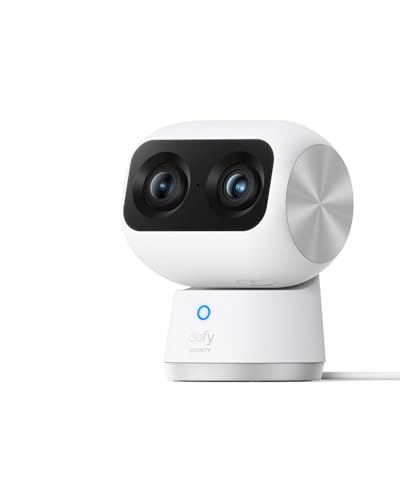
Eufy Indoor Cam S350
★★★★★ 4.3 / 5 Best for pet owners
The Eufy Indoor Cam S350 provides 4K video with AI pet detection. It has a pan and tilt head and two-way audio. Owners report clear images and accurate pet alerts.
Resolution 4KField of view 360 degree panStorage MicroSD card, cloudPower Wired
- 4K resolution
- AI pet detection
- Local storage
- Expensive
- No battery option
Best for: Best for pet owners
Choosing the right one is tricky. We compared specs, owner feedback, and use-case fit to find the best options.
Resolution and video quality
Resolution determines how clear the video is. Most cameras offer 1080p, but some go up to 2K or 4K. Higher resolution helps identify faces and license plates. Look for HDR or WDR to handle bright and dark areas. Night vision is essential for dark rooms. Color night vision is a bonus.
Field of view and pan/tilt
Field of view tells you how much area the camera sees. A wider angle covers more room. Fixed cameras have a set view, while pan and tilt models can move. Pan and tilt lets you follow motion or scan a room. Consider the size of the room you want to monitor.
Storage options
Cameras store footage locally or in the cloud. Local storage uses a microSD card, which avoids monthly fees. Cloud storage lets you access clips from anywhere but often requires a subscription. Some cameras offer free cloud storage for short clips. Decide if you want to pay for cloud recording.
Smart features and integrations
Smart features include motion detection, person detection, and two-way audio. Some cameras work with Alexa or Google Assistant. You can view live feeds on smart displays. Look for cameras that fit your existing smart home ecosystem. Privacy features like shutters are useful for indoor use.
Questions people ask
What is the best indoor security camera?
The Wyze Cam v4 is the best overall for most people. It offers 2K video, color night vision, and local storage at a low price.
How do I choose an indoor security camera?
Consider resolution, field of view, storage options, and smart features. Think about where you'll place it and if you need pan and tilt.
Can I use an indoor camera without a subscription?
Yes, many cameras support local storage via microSD. Wyze and TP-Link Tapo offer this. Cloud subscriptions are optional for extra features.
Do indoor cameras have audio?
Most have two-way audio, allowing you to listen and talk through the camera. Check the specs for built-in microphone and speaker.
Are indoor cameras safe from hackers?
Use strong passwords and enable two-factor authentication. Keep firmware updated. Choose cameras from reputable brands with encryption.
What is the difference between indoor and outdoor cameras?
Indoor cameras are not weatherproof and may lack a durable housing. They are designed for indoor use only. Outdoor cameras have IP ratings for rain and dust.
Can I view my indoor camera on my phone?
Yes, all cameras have companion apps for iOS and Android. You can view live streams, receive alerts, and review recordings.
Which indoor camera has the best video quality?
The Eufy Indoor Cam S350 offers 4K resolution, the highest among these picks. The Wyze Cam v4 and TP-Link Tapo C210 offer 2K.
Is a pan and tilt camera worth it?
If you need to cover a large area or follow motion, yes. Pan and tilt cameras can rotate to see more, but they cost more.
How much storage do I need for an indoor camera?
A 32GB microSD card stores about 3 to 7 days of continuous footage. Cloud plans vary. Estimate based on your recording needs.
The bottom lineSo which one?
For most homes, the Wyze Cam v4 offers the best mix of quality and value. If you need battery power, choose the Google Nest Cam. For Alexa users, the Ring Indoor Cam is a solid choice.