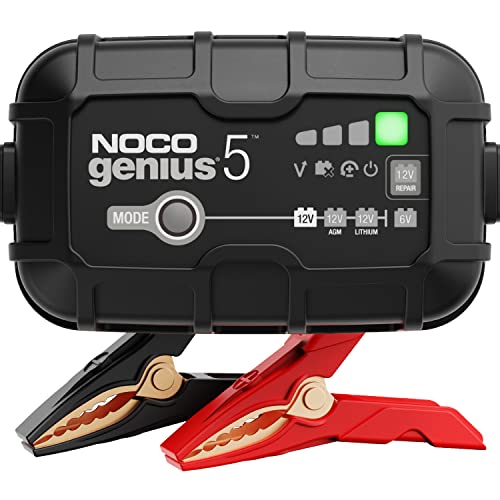
Most charging failures come from loose or corroded connections, a battery too dead to be detected, or a blown fuse in the charger. Clean the clamps, check polarity, and test with a multimeter.
You plug in your car battery charger, and nothing happens. Or it flashes an error code and refuses to charge. It's a frustrating moment, especially when you need to get back on the road. The good news is that most charging problems are simple to diagnose and fix at home. Our editorial team compared specifications, buyer feedback, and common failure points to bring you a practical troubleshooting guide.
Why Your Car Battery Charger Isn't Working
There are three main reasons a charger fails to charge: a poor connection, a battery that's too far gone, or a charger that's defective. Let's break down each one so you can identify the culprit.
Bad Connections and Corrosion
Corrosion on battery terminals is a top cause. White or bluish crusty deposits can prevent the charger from making a solid electrical contact. Even if the clamps look attached, the connection may be weak. Also, loose clamps can cause arcing and voltage drops, confusing the charger's safety circuits.
Battery Voltage Too Low
Smart chargers often have a minimum voltage threshold, usually around 10 volts for a 12V battery. If your battery has been drained below that, the charger may not recognize it and will refuse to start. This is a safety feature to prevent charging a shorted cell, but it can be frustrating.
Charger Defects and Fuses
Chargers can fail internally. A blown fuse, a broken cable, or a faulty circuit board can stop the charger from outputting any power. Some chargers have a replaceable fuse, but many are sealed. If you've ruled out connection and battery issues, the charger might be at fault.
How to Fix a Non-Charging Car Battery Charger
Follow these steps in order. They'll help you isolate the problem and get your charger working again.
- Check the power source. Plug the charger into a working outlet. Try a different outlet or use a lamp to confirm the outlet has power. If the charger has a power switch, make sure it's on.
- Inspect the clamps and cables. Look for frayed wires, broken insulation, or bent clamp teeth. Replace the charger if the cables are damaged.
- Clean the battery terminals. Disconnect the charger. Mix baking soda and water to neutralize corrosion. Scrub the terminals and cable clamps with a wire brush until they're shiny. Rinse with water and dry thoroughly.
- Verify polarity. Connect the red clamp to the positive terminal and the black clamp to the negative terminal. If you reversed them, the charger may show an error. Some chargers have reverse-polarity protection, but it's still a common mistake.
- Check the battery voltage. Use a multimeter to measure the battery's voltage. If it's below 10 volts, try a manual charger or a 'boost' mode if your charger has one. Some smart chargers have a 'wake up' feature for dead batteries.
- Test the charger output. With the charger unplugged, set your multimeter to DC volts. Touch the probes to the clamps (red to positive, black to negative). If you see close to zero volts, the charger may have a blown fuse or internal fault. If it reads around 13.5 to 14.5 volts, the charger is likely fine.
- Check for a fuse. Some chargers have a fuse near the AC plug or inside a compartment. If you can access it, test it with a multimeter or replace it with the same rating.
- Try a different battery. Connect the charger to a known-good battery. If it charges that one, the original battery is likely bad. If it still fails, the charger is probably defective.
When to Replace Your Charger
If you've gone through all the steps and the charger still doesn't work, it's time to consider a replacement. Also, if the charger is old, shows signs of overheating, or has a cracked case, replacing it is safer than repairing. Modern chargers with microprocessors and desulfation modes are more reliable and can extend battery life.
Preventing Future Charging Issues
Keep your battery terminals clean and apply a thin layer of petroleum jelly or terminal grease to prevent corrosion. Store your charger in a dry place and avoid dropping it. Also, don't leave a battery completely discharged for long periods; use a trickle charger or battery maintainer to keep it topped up.
Frequently Asked Questions
Why does my charger show a 'bad battery' error?
This usually means the battery voltage is too low or the battery has a shorted cell. Try a different battery to confirm. If the charger works on another battery, the original battery may need replacement.
Can a battery charger overcharge a battery?
Yes, if it's an old manual charger without auto shutoff. Modern smart chargers automatically stop or switch to float mode. Always follow the manufacturer's instructions.
What should I do if the charger gets hot?
Some warmth is normal, but excessive heat is a danger sign. Unplug the charger and let it cool. Check for loose connections or a faulty battery. If it continues to overheat, replace it.
By following these steps, you can often fix a non-charging car battery charger without spending a dime. If you need to buy a new one, compare features like amperage, safety certifications, and warranty. Remember to check the current price on Amazon for the best deals.