
The Feronix B26 is a Bluetooth OBD2 scanner, which means it is a small adapter that plugs into your car's diagnostic port and then talks to a phone app over Bluetooth instead of showing results on its own screen. It is aimed at everyday drivers who want to understand a check engine light before deciding whether a problem is urgent or can wait. This article is an editorial overview built from the current Amazon listing and the published specifications, not a hands on review, so it describes what the product says it does rather than how it behaved in our hands. Use it as a buyer's briefing, and confirm the specifics that matter to you on the live listing before ordering.
What it is
An OBD2 scanner reads the standardized diagnostic information that modern cars store in their onboard computers. When a fault is detected, the car logs a diagnostic trouble code and often turns on the check engine light. A scanner lets you pull those codes so you can see what the car is complaining about. The Feronix B26 takes the dongle approach rather than the handheld approach. There is no built in display. Instead, the adapter sits in the OBD2 port, usually found under the dashboard near the steering column, and sends the data to a companion app on your phone.
According to the listing, the B26 supports both iOS and Android, so it is meant to pair with an iPhone or an Android device. The listing positions it as a subscription free engine code reader, which suggests the core job of reading and clearing engine codes is meant to work without an ongoing fee. As with every OBD2 scanner, the practical ceiling of what you can diagnose depends on the vehicle and on the software, so the sections below separate what the listing clearly states from what you should confirm yourself.
Key features
Based on the current listing, the headline points are straightforward. The B26 is a Bluetooth adapter rather than a wired or standalone unit. It is described as working with both iOS and Android phones through a companion app. It is marketed as subscription free, which the seller frames as a contrast to scanners whose apps push recurring charges. The listing describes it as an engine code reader and engine diagnostic tool, and it specifically calls out resetting the check engine light for temporary and pending faults. In plain terms, the listing centers the product on reading engine related trouble codes and clearing the light once you have noted the code. The product name also carries a 2026 upgraded label, which is marketing language rather than a verified specification, so weight it accordingly.
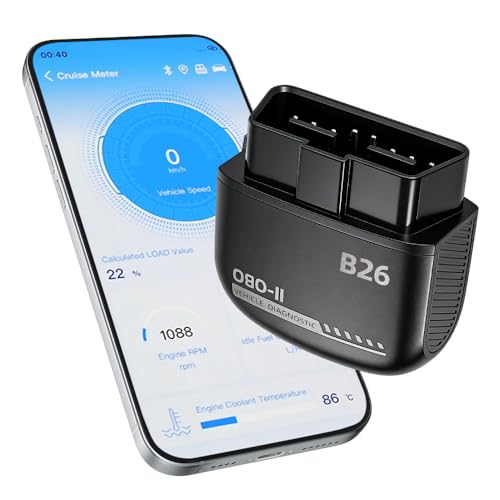
Feronix B26 Bluetooth OBD2 Scanner for iOS and Android, Subscription Free Engine Code Reader
Bluetooth OBD2 code reader that pairs with an iOS or Android app, marketed as subscription free for reading and clearing engine fault codes.
Check price on AmazonWho it is for
This kind of scanner suits DIY car owners and budget minded drivers who mainly want to answer one question when a warning light appears: is this something I need to deal with right now, or can it wait until the weekend. If you want to read a check engine light, note the code, look it up, and decide whether to clear it or take the car in, an app based reader like this fits that job. It is also handy before a used car purchase, letting you glance at whether the engine computer is flagging anything, and before an emissions appointment if you want a rough sense of the car's state. It is a weaker fit for professional mechanics, for people who need deep manufacturer specific diagnostics, or for anyone who expects to reprogram modules or diagnose airbag and ABS systems, unless the listing specifically promises those abilities. Set expectations around the engine side of diagnostics, which is where the listing places its emphasis.
Strengths on paper
On paper the appeal is simplicity and value. A dongle that uses your phone as the screen avoids paying for a dedicated display, and it keeps the hardware small enough to leave plugged in or drop in the glovebox. The subscription free framing is a genuine plus if it holds up, because some competing scanners lean on apps that gate useful features behind a recurring charge, and avoiding that is worth confirming. Dual platform support, if your specific phone and operating system version are covered, means you are not locked into one brand of handset. And the explicit mention of clearing the check engine light for pending and temporary faults speaks directly to the most common reason casual users buy a scanner, which is to understand and reset a nuisance light after addressing the cause. These are reasonable strengths for the category, provided the listing's claims match what arrives.
Things to check
Before you buy, verify a few things directly on the listing, because the product name alone does not settle them. First, platform support. The listing states iOS and Android, but phone compatibility can hinge on operating system version and Bluetooth type, so check that your exact phone is covered. Second, the required app and any paid features. Find the name of the companion app the scanner needs, and read its description and reviews, since many Bluetooth scanners are sold as subscription free hardware while the app still keeps advanced functions behind an in app purchase. Confirm that the features you care about are actually free.
Third, what it reads. The listing language centers on engine trouble codes and clearing the light, including pending and temporary faults. If you specifically need live sensor data, freeze frame data, emissions readiness monitors, or access to systems beyond the engine, confirm that those are included rather than assuming them. Fourth, vehicle coverage. OBD2 scanners generally work on cars sold in the United States from model year 1996 onward, which is when the standard became mandatory there, so check that your vehicle has a standard OBD2 port and is covered. Finally, keep expectations grounded: a basic Bluetooth scanner is not a professional dealer level tool unless the listing explicitly says so, and clearing a code does not repair the underlying issue, so a light that returns is telling you the fault is still present.
How it compares
The useful comparison here is not against one rival product but between two formats. An app based Bluetooth scanner like the B26 trades a dedicated screen for the convenience of using your phone, tends to be smaller and cheaper, and leans on software updates through the app. The trade off is that it depends on a stable Bluetooth connection, on a phone with enough battery and a compatible operating system, and on the quality of the companion app, which varies widely across brands. A standalone handheld scanner, by contrast, has its own screen and buttons, works without a phone or an app, and is often favored by people who want a self contained tool they can hand to anyone. Handhelds can be bulkier and sometimes have dated menus, but they remove the app from the equation. Neither format is automatically better. If you already live on your phone and want something small and inexpensive, the Bluetooth route makes sense. If you want a tool that just works on its own, a handheld may suit you more. Judge the B26 on how well its specific app and coverage match your car and your phone, rather than on the format alone.
Verdict
The Feronix B26 presents itself as a simple, subscription free way to read and clear engine trouble codes from an iPhone or Android phone, with particular emphasis on turning off the check engine light for pending and temporary faults. For a DIY owner who mainly wants to understand a warning light and decide on next steps, that is a sensible and modest goal, and the format has real convenience advantages. The honest caveats are the ones that apply to the whole category: confirm your phone is supported, find out exactly which app it uses and whether any features cost extra, check whether live data and non engine systems are included, make sure your car falls within standard OBD2 coverage, and remember this is a basic reader rather than a dealer level diagnostic system. If those boxes line up with what you need, it is a reasonable candidate. To see current details, compatibility notes, and the latest information straight from the seller, check the current listing.
This is an editorial overview based on the current Amazon listing and published specs, not a hands on review, and we have not tested or used this unit. ProductPickly may earn a commission from qualifying purchases made through links on this page.