Memory Cards and Storage
Best Memory Cards for 4K Video in 2026
7 picks compared
6 min read
ProductPickly is reader-supported. When you buy through links on our site, we may earn an affiliate commission at no extra cost to you. It never changes our picks.
The short answerFor most 4K shooters, the SanDisk Extreme Pro SDXC UHS-I, Lexar Professional 1667x, and Sony SF-G Tough series lead. They sustain high write speeds. Choose based on capacity and durability needs.
?How we pickedWe compare published specifications, safety certifications and thousands of verified owner reviews, and we do not physically test every unit. Read the full process in our review methodology.
SanDisk Extreme Pro SDXC UHS-I
★★★★★ 4.8 / 5 Best Overall
The SanDisk Extreme Pro is a top pick for 4K video. It delivers consistent write speeds that handle high bitrates. Owners praise its durability and long-term reliability.
Capacity 64GB to 1TBSpeed Class U3, V30Read Speed Up to 200 MB/sWrite Speed Up to 140 MB/s
- Sustained write speed for 4K
- Available in large capacities
- Backed by limited lifetime warranty
- Not the fastest for 4K 120p
- More expensive than budget cards
Lexar Professional 1667x SDXC UHS-II
★★★★★ 4.7 / 5 Best for High-Bitrate 4K
The Lexar 1667x uses UHS-II technology for faster transfer. It sustains high write speeds needed for 4K 60p and 120p. Creators with demanding workflows appreciate the speed.
Capacity 64GB to 256GBSpeed Class U3, V60Read Speed Up to 250 MB/sWrite Speed Up to 120 MB/s
- V60 rating for high bitrates
- Fast offload with UHS-II reader
- Good value for UHS-II performance
- Requires UHS-II slot for full speed
- Limited capacity options
Best for: Best for High-Bitrate 4K
Sony SF-G Tough Series SDXC UHS-II
★★★★★ 4.7 / 5 Best for Rugged Use
The Sony SF-G Tough is designed for extreme conditions. It is shockproof, waterproof, and dustproof. This card suits outdoor and action camera use.
Capacity 32GB to 128GBSpeed Class U3, V60Read Speed Up to 300 MB/sWrite Speed Up to 299 MB/s
- Rugged build for harsh environments
- Very high sustained write speed
- Resists bending and breaking
- Premium price
- Capacity tops out at 128GB
Best for: Best for Rugged Use
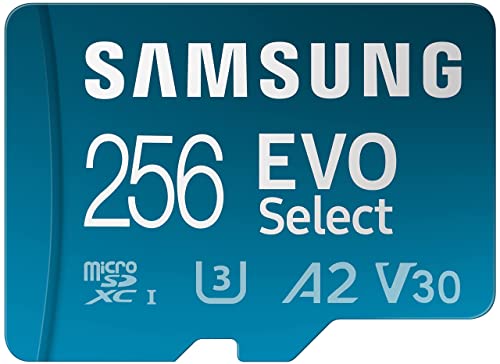
Samsung EVO Select microSDXC
★★★★★ 4.7 / 5 Best Budget microSD
The Samsung EVO Select is a budget-friendly microSD card. It offers solid speed for 4K on drones and smartphones. Many users report reliable performance for the price.
Capacity 64GB to 512GBSpeed Class U3, V30Read Speed Up to 130 MB/sWrite Speed Up to 30 MB/s
- Low cost per gigabyte
- Good for 4K on phones and drones
- Includes SD adapter
- Write speed is modest
- Not for high-bitrate 4K
Best for: Best Budget microSD
ProGrade Digital V60 SDXC UHS-II
★★★★★ 4.6 / 5 Best for Professional Video
ProGrade Digital targets professional videographers. The V60 card sustains high write speeds for long recordings. It is a trusted choice among working creators.
Capacity 64GB to 512GBSpeed Class U3, V60Read Speed Up to 250 MB/sWrite Speed Up to 130 MB/s
- Sustained write performance
- Large capacity options
- Built for professional use
- Higher price than consumer cards
- Requires UHS-II support
Best for: Best for Professional Video
SanDisk Extreme microSDXC UHS-I
★★★★★ 4.8 / 5 Best for Action Cameras
The SanDisk Extreme microSD is a popular choice for GoPro and DJI. It handles 4K video and is built to withstand rough use. Owners report consistent performance in the field.
Capacity 64GB to 1TBSpeed Class U3, V30Read Speed Up to 190 MB/sWrite Speed Up to 130 MB/s
- Fast enough for 4K action cams
- Durable and temperature resistant
- Wide capacity range
- Not UHS-II for fastest transfers
- Can get warm under heavy load
Best for: Best for Action Cameras
Kingston Canvas React Plus SDXC UHS-II
★★★★★ 4.6 / 5 Best Value UHS-II
The Kingston Canvas React Plus offers UHS-II speed at a competitive price. It delivers fast read and write speeds for 4K. This card balances performance and cost.
Capacity 64GB to 256GBSpeed Class U3, V90Read Speed Up to 300 MB/sWrite Speed Up to 260 MB/s
- V90 rating for high bitrates
- Excellent value for UHS-II
- Fast transfer speeds
- Not as rugged as Tough series
- Limited availability in some regions
Best for: Best Value UHS-II
Choosing the right card means matching speed class to your camera's bitrate. We focused on V30 and V60 ratings, sustained write performance, and build quality.
Understand Speed Classes
Speed classes indicate minimum sustained write speed. V30 guarantees 30 MB/s, V60 60 MB/s, and V90 90 MB/s. For 4K, V30 is the baseline. High-bitrate 4K, like 400 Mbps, requires V60 or higher. Check your camera's manual for the required class.
Match Card to Camera
Different cameras have different UHS bus support. UHS-I cards work in any slot, but UHS-II cards need a UHS-II slot for full speed. Using a UHS-II card in a UHS-I slot still works, but slower. Consider your camera's write speed limits.
Consider Capacity and Workflow
4K video files are large. A 64GB card holds about 30 minutes of high-bitrate footage. Larger capacities reduce card swaps but cost more. Think about your shooting day and backup strategy. Multiple smaller cards can be safer.
Durability and Reliability
Memory cards can fail. Look for cards with shockproof, waterproof, and x-ray proof features. Brands like Sony and SanDisk offer tough builds. Always format the card in-camera and avoid filling it completely. Keep backups of important footage.
Questions people ask
What speed class do I need for 4K video?
For most 4K, V30 is sufficient. For high frame rates or high bitrates, choose V60 or V90. Check your camera's bitrate to be sure.
Is UHS-II worth it for 4K?
UHS-II helps with faster offloads and high-bitrate recording. If you shoot 4K 60p or higher, UHS-II is beneficial. For standard 4K 30p, UHS-I is often enough.
Can I use a microSD card in a camera?
Yes, with an adapter. But performance may be limited. Use a full-size SD card for best compatibility.
What is the difference between U3 and V30?
U3 and V30 both guarantee 30 MB/s minimum write. V30 is a newer standard that also ensures sustained performance. They are equivalent for most purposes.
How long can I record 4K on a 128GB card?
It depends on bitrate. At 100 Mbps, about 2.5 hours. At 400 Mbps, about 40 minutes. Higher bitrates use more space.
Are expensive cards worth it?
For professional work, yes. They offer better durability and sustained speeds. For casual use, budget cards may suffice.
Which brand is most reliable for 4K?
SanDisk, Sony, and Lexar are top brands. ProGrade and Kingston also have strong reputations. Choose based on your specific needs.
Can a slow card damage my camera?
No, but it can cause recording stops or corrupted files. Always use a card that meets the camera's requirements.
The bottom lineSo which one?
The SanDisk Extreme Pro is the best all-around choice for 4K. For high-bitrate or rugged use, consider the Lexar 1667x or Sony Tough. Budget buyers can rely on the Samsung EVO Select for basic 4K.