Scanners
Slide Scanners for Photos and Negatives: Top Picks
7 picks compared
6 min read
ProductPickly is reader-supported. When you buy through links on our site, we may earn an affiliate commission at no extra cost to you. It never changes our picks.
The short answerThe best slide scanners are the Plustek OpticFilm 8200i for sharp 35mm scans, the Kodak Slide N Scan for quick previews, and the Wolverine Titan for bulk digitizing. Each fits a different need.
?How we pickedWe compare published specifications, safety certifications and thousands of verified owner reviews, and we do not physically test every unit. Read the full process in our review methodology.
Plustek OpticFilm 8200i SE
★★★★★ 4.5 / 5 best overall for 35mm film
This dedicated 35mm scanner delivers 7200 dpi optical resolution. It includes infrared dust removal to reduce spotting. Owners report excellent color accuracy and fine detail.
Resolution 7200 dpiFilm types 35mm slides and negativesInterface USB 2.0Software SilverFast 8 SE Plus
- Exceptional sharpness
- Infrared dust removal
- Bundled SilverFast software
- Slow scan times
- No automatic feeder
Best for: best overall for 35mm film
Kodak Slide N Scan
★★★★★ 4.4 / 5 best value for quick previews
This portable scanner digitizes slides and negatives at 14 megapixels. It has a 3.5 inch LCD for previewing. No computer is required for basic scans.
Resolution 14 MPFilm types 35mm slides and negativesDisplay 3.5 inch LCDStorage SD card up to 32GB
- Standalone operation
- Large preview screen
- Simple controls
- Lower resolution than dedicated scanners
- Manual feeding
Best for: best value for quick previews
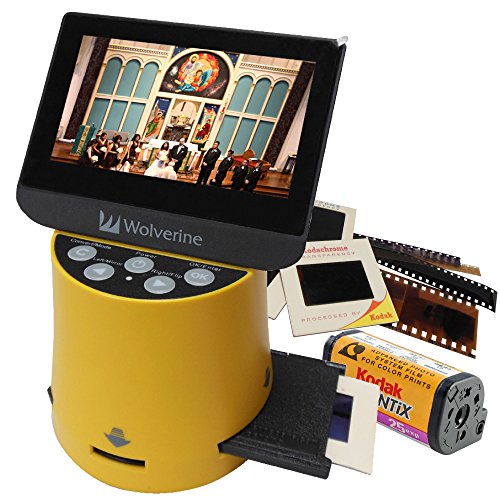
Wolverine Titan 8-in-1
★★★★★ 4.2 / 5 best for bulk digitizing
The Titan scans slides, negatives, and photos up to 8x10 inches. It features a 14 megapixel sensor and a 3 inch LCD. It can save directly to SD or USB.
Resolution 14 MPMedia types Slides, negatives, photosDisplay 3 inch LCDStorage SD, USB
- Handles multiple media types
- Batch scanning capability
- No computer needed
- Image quality varies
- Software can be finicky
Best for: best for bulk digitizing
Epson Perfection V600
★★★★★ 4.6 / 5 best for mixed media
This flatbed scanner handles slides, negatives, and reflective prints. It offers 6400 dpi optical resolution and Digital ICE for dust removal. It includes film holders for up to 12 frames.
Resolution 6400 dpiMedia types Slides, negatives, printsInterface USB 2.0Software Epson Scan, ArcSoft MediaImpression
- Versatile media support
- High resolution
- Digital ICE technology
- Bulky footprint
- Scanning multiple strips is slow
Best for: best for mixed media
Nikon Coolscan 5000 ED
★★★★★ 4.7 / 5 best for archival quality
This discontinued but still sought-after model offers 4000 dpi resolution. It features Nikon's Digital ICE4 and multi-sample scanning. It is known for exceptional dynamic range.
Resolution 4000 dpiFilm types 35mm slides and negativesInterface FireWire, USB 2.0Software Nikon Scan
- Superb color depth
- Advanced dust removal
- Reliable build
- No longer manufactured
- Requires older software
Best for: best for archival quality
Canon CanoScan 9000F Mark II
★★★★★ 4.3 / 5 best for medium format
This flatbed scanner supports 35mm, 120, and 220 film. It offers 9600 dpi resolution and FARE Level 3 for dust removal. It can scan up to 120 mm film strips.
Resolution 9600 dpiFilm types 35mm, 120, 220Interface USB 2.0Software Canon ScanGear
- Medium format support
- High resolution
- Auto dust removal
- Software is basic
- Scanning is slow at high resolution
Best for: best for medium format
Reflecta ProScan 10T
★★★★★ 4.1 / 5 best for automated batch scanning
This dedicated slide scanner has an automatic feeder for up to 100 slides. It scans at 10 megapixels and includes SilverFast software. It is ideal for large collections.
Resolution 10 MPFeeder capacity 100 slidesInterface USB 2.0Software SilverFast 8
- High throughput
- Bundled SilverFast
- Handles mounted slides
- Expensive
- Feeder can jam with damaged slides
Best for: best for automated batch scanning
We focused on resolution, dynamic range, and ease of use. We also considered batch scanning and software reliability. These factors matter most for getting good results.
What to look for in a slide scanner
Resolution is key, but more is not always better. 3000 dpi is enough for most prints. For large enlargements, 4000 dpi or higher helps. Dynamic range matters for shadow detail. Check the optical density rating. A rating above 3.4 is good. Software quality affects your workflow. Look for batch scanning and dust removal features.
Dedicated slide scanners vs flatbeds
Dedicated scanners like the Plustek are built for film. They produce sharper scans with better color. Flatbeds like the Epson V600 are more versatile. They can also scan photos and documents. Consider your primary use. If you only scan slides, a dedicated scanner is better. If you need a general scanner, a flatbed may suffice.
Resolution and image quality
Optical resolution is what matters, not interpolated. Higher resolution reveals film grain. But it also increases file size and scan time. For web sharing, 1500 dpi is enough. For archival, aim for 3000 dpi or more. Dynamic range is often overlooked. It determines how well shadows and highlights are captured. Look for scanners with high optical density.
Software and workflow
Bundled software can make or break the experience. SilverFast is powerful but has a learning curve. Epson Scan is user-friendly for beginners. Some scanners work standalone with an SD card. That is convenient for quick digitizing. For batch scanning, look for automatic feeders or multi-strip holders. Check if the software supports your operating system.
Questions people ask
What is the best slide scanner for 35mm film?
The Plustek OpticFilm 8200i SE is the top choice for 35mm. It offers 7200 dpi resolution and infrared dust removal. Owners praise its sharpness and color accuracy.
Can I scan slides without a computer?
Yes, several models like the Kodak Slide N Scan work standalone. They save scans to an SD card. This is convenient for quick digitizing without a PC.
How many dpi do I need for scanning slides?
For most uses, 3000 dpi is sufficient. For large prints or archival, 4000 dpi or higher is better. Higher dpi reveals more film grain but increases file size.
Is a flatbed scanner good for slides?
Flatbeds like the Epson V600 can scan slides well. They are versatile, but dedicated scanners often produce sharper results. Consider your need for scanning photos and documents.
What is Digital ICE and do I need it?
Digital ICE is a dust and scratch removal technology. It uses infrared light to detect defects. It saves time in post-processing. It is useful if you have dusty or scratched slides.
How long does it take to scan a slide?
Scanning time varies by resolution and model. At 3000 dpi, a single slide may take 30 seconds. At 7200 dpi, it can take several minutes. Batch feeders speed up the process.
Can I scan medium format slides with a slide scanner?
Some flatbeds like the Canon 9000F Mark II support medium format. Dedicated 35mm scanners cannot. Check the specifications for film format support.
What is the best budget slide scanner?
The Kodak Slide N Scan is a good budget option. It is affordable and easy to use. However, it has lower resolution than dedicated scanners.
Is a slide scanner worth it for occasional use?
If you have a small collection, a flatbed scanner may be enough. For large collections, a dedicated scanner or batch feeder saves time. Consider your volume and quality needs.
Which slide scanner has the best software?
Plustek includes SilverFast, which is powerful but complex. Epson Scan is user-friendly. Reflecta also bundles SilverFast. Choose based on your comfort with software.
The bottom lineSo which one?
For most people, the Plustek OpticFilm 8200i SE offers the best balance of quality and value. If you need speed, the Kodak Slide N Scan is a solid choice. For mixed media, the Epson V600 is versatile. Choose based on your collection size and quality expectations.