Finding a cheap 4K video camera for vlogging and YouTube is easier than ever, but the options can be overwhelming. Our editorial team compared specifications, buyer feedback, and key decision factors to bring you the best picks under a budget. Whether you are a beginner or a growing creator, these cameras deliver solid 4K quality without costing a fortune.
What to Look for in a Budget 4K Vlogging Camera
Before you hit the buy button, consider these essential specs and features. They can make or break your vlogging experience.
Sensor Size and Low Light Performance
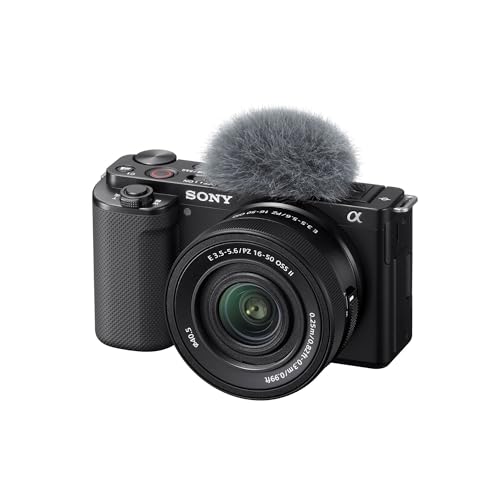
A larger sensor, like APS-C or 1-inch, captures more light and produces better image quality, especially in dim environments. The Sony ZV-E10 has an APS-C sensor, while the DJI Osmo Pocket 3 and Canon PowerShot V10 use 1-inch sensors. If you often film indoors or at night, prioritize a larger sensor.
Autofocus System
Reliable autofocus keeps you sharp as you move or present products. Look for cameras with face and eye tracking. Sony's Real-Time Eye AF is a standout, but DJI and Canon also offer solid AF. Avoid older models with slow contrast-detect AF.
Stabilization
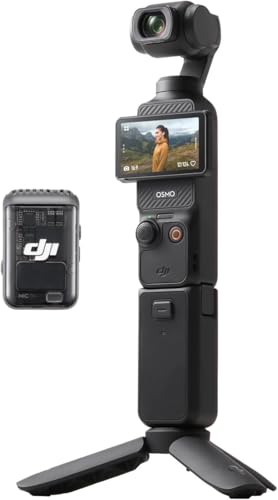
Handheld vlogs can look shaky. Optical or gimbal stabilization is ideal. The DJI Osmo Pocket 3 has a built-in gimbal, and the GoPro Hero 12 Black excels with HyperSmooth 6.0. Sony and Panasonic rely on electronic stabilization, which works but may crop the image.
Flip Screen and Audio Inputs
A flip or vari-angle screen is essential for self-framing. Also, check for a 3.5mm microphone input. The Canon PowerShot V10 lacks one, which is a dealbreaker for serious audio. The Sony, Panasonic, and DJI all have mic inputs (DJI uses a wireless mic system).
Lens Options and Zoom
Interchangeable lens cameras like the Sony ZV-E10 and Panasonic G100 let you change lenses for different shots. Fixed-lens cameras are simpler but limit your reach. If you plan to do interviews or close-ups, consider a camera with a zoom lens or a wide aperture.
Common Mistakes to Avoid When Buying a Vlogging Camera
Many creators fall into these traps. Save yourself time and money by avoiding them.
Ignoring Audio Quality
Viewers forgive bad video but not bad audio. If a camera lacks a mic input, you will need to record audio separately. That adds complexity and cost. Choose a camera with a 3.5mm jack or a built-in high-quality mic, like the Panasonic G100's tracking microphone.
Overlooking Battery Life
Vlogging drains batteries fast. Check the battery life rating and buy spare batteries. The Sony ZV-E10 has average battery life, so you may need extras for a full day of shooting. The GoPro Hero 12 Black also uses power quickly in high frame rates.
Buying More Camera Than You Need
You do not need a cinema camera for YouTube. A simple setup with a flip screen and good AF is enough. Avoid spending extra on features like 8K or raw video that you will rarely use. Focus on the basics that matter for your content.
Forgetting About Editing Workflow
4K files are large and require a capable computer. If your PC is old, consider shooting in 1080p or check if the camera offers efficient codecs like H.265. The DJI Osmo Pocket 3 records in 10-bit, which gives more color grading flexibility but needs more storage.
Not Considering Future Upgrades
If you are serious about content creation, think about your growth. An interchangeable lens camera like the Sony ZV-E10 lets you upgrade lenses without changing the body. A fixed-lens camera is fine for now but may limit you later.
Our Top Picks at a Glance
Here is a quick overview of the five best cheap 4K video cameras for vlogging and YouTube.
- Sony ZV-E10: Best overall, APS-C sensor, interchangeable lenses, excellent AF.
- DJI Osmo Pocket 3: Best portable, built-in gimbal, 1-inch sensor, 4K 120p.
- Canon PowerShot V10: Best ultra-compact, built-in stand, simple controls.
- Panasonic Lumix G100: Best for creators, MFT sensor, tracking microphone.
- GoPro Hero 12 Black: Best action, rugged, HyperSmooth 6.0, 5.3K.
Frequently Asked Questions
Here are answers to common questions from our readers.
Is 4K worth it on a budget camera?
Yes, 4K gives you more flexibility in editing and future-proofs your content. Even if you upload in 1080p, shooting in 4K lets you crop without losing quality. Many budget cameras now offer good 4K, so it is a worthwhile feature.
Can I use these cameras for live streaming?
Most of these cameras can be used for live streaming via USB or HDMI. The Sony ZV-E10 and Panasonic G100 have clean HDMI output. The GoPro Hero 12 Black can also stream, but you may need a capture card.
What is the difference between a vlogging camera and a regular camera?
Vlogging cameras are designed for self-recording. They typically have flip screens, good autofocus, microphone inputs, and compact bodies. Regular cameras may lack these features, making them less convenient for vlogging.
How much should I spend on a first vlogging camera?
You can get a solid 4K vlogging camera for under $500. The Sony ZV-E10 and DJI Osmo Pocket 3 are great options in that range. If you are just starting, consider the Canon PowerShot V10 for its simplicity.
Do I need a gimbal for vlogging?
Not necessarily. Many cameras have built-in stabilization that works well for vlogs. The DJI Osmo Pocket 3 has a gimbal built-in, so you do not need an external one. For other cameras, a gimbal can help but is not essential.
Final Verdict
After careful analysis, the Sony ZV-E10 is our best overall pick for a cheap 4K vlogging camera. It offers the best balance of image quality, autofocus, and lens versatility. For those who prioritize portability, the DJI Osmo Pocket 3 is a close second. Whichever you choose, you will be well-equipped to start creating engaging YouTube content.