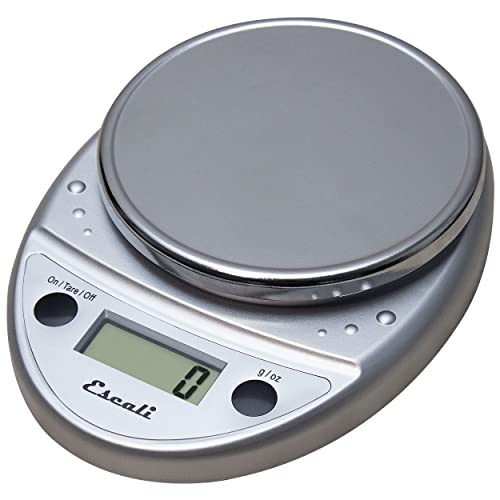
Place your scale on a flat surface, press the calibration button (if available), then add the correct calibration weight or a known object like a coin. Wait for the display to confirm. If your scale lacks a calibration mode, use the tare function with a known weight.
Our editorial team compared specifications, buyer feedback and key decision factors to bring you this calibration guide. A kitchen scale is a workhorse for baking, meal prep and portion control. But even the best digital or mechanical scale can drift over time due to temperature changes, battery drain, or mechanical wear. Regular calibration keeps your measurements accurate, which is critical for recipes that rely on precise ratios. This guide covers calibration methods for both digital and mechanical scales, using calibration weights or everyday coins.
Why Calibration Matters
Accuracy is the foundation of consistent cooking and baking. A scale that is off by even a few grams can throw off a delicate cake or a batch of cookies. For example, a bread recipe requiring 500g of flour could be ruined if the scale reads 480g or 520g, leading to a dense or dry loaf. Over time, sensors in digital scales can lose their reference point due to aging components or electrical noise. Mechanical scales rely on springs that can fatigue or stretch after repeated use, causing the pointer to drift. Environmental factors like humidity and temperature also affect readings: high humidity can cause corrosion in electrical contacts, while temperature swings can expand or contract metal parts. Regular calibration corrects these errors and restores accuracy, ensuring that your measurements are reliable for every recipe.
How to Calibrate a Digital Kitchen Scale
Digital scales often have a calibration mode. Follow these steps:
- Place the scale on a hard, level surface. Avoid carpet or uneven countertops, as these can cause the scale to tilt and give inaccurate readings. A granite or butcher block counter is ideal.
- Turn on the scale and wait for it to show zero. If it does not read zero, press the tare or zero button. Some scales auto-zero after a few seconds.
- Press and hold the calibration button (often labeled "CAL," "MODE," or a combination). The display may flash or show "CAL." Refer to your manual if the button is not obvious; some scales require pressing the unit button for 3 seconds.
- Add the required calibration weight. Many scales require a 100g or 200g weight. If you do not have a calibration weight, use a U.S. nickel (5g) or a stack of nickels. For example, 20 nickels equal 100g. Ensure the nickels are centered on the platform to avoid off-center loading errors.
- Wait for the display to show the correct weight or "PASS." Then remove the weight. The scale is now calibrated. Some scales will automatically turn off after calibration.
- If your scale does not have a calibration mode, you can still check accuracy. Place a known weight (like a nickel) and press tare. The scale should read the correct weight. If it does not, you may need to replace the scale or use a different method. Some budget scales lack calibration but can be adjusted by turning a small potentiometer inside, but this voids the warranty.
For scales with a calibration mode, always use the exact weight specified in the manual. Using a different weight can cause the scale to calibrate incorrectly. If you lose the manual, check the manufacturer's website for instructions.
How to Calibrate a Mechanical Kitchen Scale
Mechanical scales (dial or spring scales) are simpler but still need adjustment:
- Place the scale on a flat surface. Make sure the pointer or dial is at zero. If not, use the adjustment knob or screw (usually on the back or bottom) to set it to zero. Some scales have a screw that you turn with a coin or screwdriver.
- Place a known weight on the platform. Calibration weights are best, but you can use coins or a sealed bag of sugar (check the labeled weight). For example, a 1kg bag of sugar is accurate to within a few grams. Center the weight to avoid binding.
- Read the dial. If the pointer does not match the known weight, use the adjustment mechanism to move the pointer until it reads correctly. This may involve turning a screw or moving a counterweight. Make small adjustments and recheck.
- Remove the weight and check that the pointer returns to zero. Repeat if necessary. Mechanical scales often require several iterations to get both zero and full-scale accurate.
Mechanical scales are less precise than digital ones, but regular calibration keeps them usable for most kitchen tasks. If the spring is stretched or the mechanism is worn, replacement may be more cost-effective than repair.
Common Calibration Mistakes to Avoid
Even with the right steps, calibration can fail if you make these errors:
- Using an uneven or soft surface. Always calibrate on a hard, level surface.
- Not allowing the scale to warm up. Digital scales need a few seconds to stabilize after turning on.
- Using dirty or worn coins. Dirt or scratches can change a coin's weight. Clean coins with alcohol and let them dry before use.
- Overloading the scale during calibration. Use only the recommended weight.
- Ignoring the battery level. Low batteries can cause erratic readings. Replace batteries if the scale shows a low battery icon or if the display dims.
When to Replace Your Kitchen Scale
Sometimes calibration cannot fix a scale. Consider replacing your scale if:
- The scale will not hold zero after calibration attempts.
- Readings are inconsistent even after calibration (e.g., same weight gives different numbers). This indicates a faulty load cell.
- The display is damaged or unreadable.
- The scale has physical damage like cracks or rust, which can affect internal components.
- You have tried multiple calibration methods and accuracy does not improve.
- The scale is more than 5 years old and has been used heavily; sensors and springs degrade over time.
For most home cooks, a mid-range digital scale with a calibration function is sufficient. Look for models with a removable platform for easy cleaning and a backlit display for readability. Check the current price on Amazon for top-rated models.